
Pandao Booking Pro · Payments
WooCommerce payments for hotel bookings: any gateway, on your own site
Pandao Booking Pro sends the payment of a stay, the deposit or the full amount, to WooCommerce's checkout, where guests pay with any gateway you've set up there: Paystack, Razorpay, iDEAL, M-Pesa, Mercado Pago, Mollie and any card gateway. No shop, no cart, no product to create: the booking stays in Pandao Booking, only the payment goes through WooCommerce.
Get Pro from $99/year Try the live demo
Requires Pandao Booking, the free WordPress hotel booking plugin. 30-day money-back guarantee.
Why pay through WooCommerce?
The free Pandao Booking plugin takes card payments through Stripe and PayPal. That covers most properties, but not all: a hotel in Nigeria wants Paystack, one in India wants Razorpay or UPI, one in Brazil wants Mercado Pago, one in Kenya wants M-Pesa, and in the Netherlands guests expect iDEAL. WooCommerce has a gateway for nearly every payment method in the world, often maintained by the payment company itself. The WooCommerce payments module of Pandao Booking Pro lets your guests pay for their stay through those gateways, without turning your booking site into an online shop.
How a guest pays
- On the booking form, the guest picks the payment method you've named, Online payment by default, beside the free plugin's own methods (card through Stripe, PayPal, bank transfer, cheque, at the property).
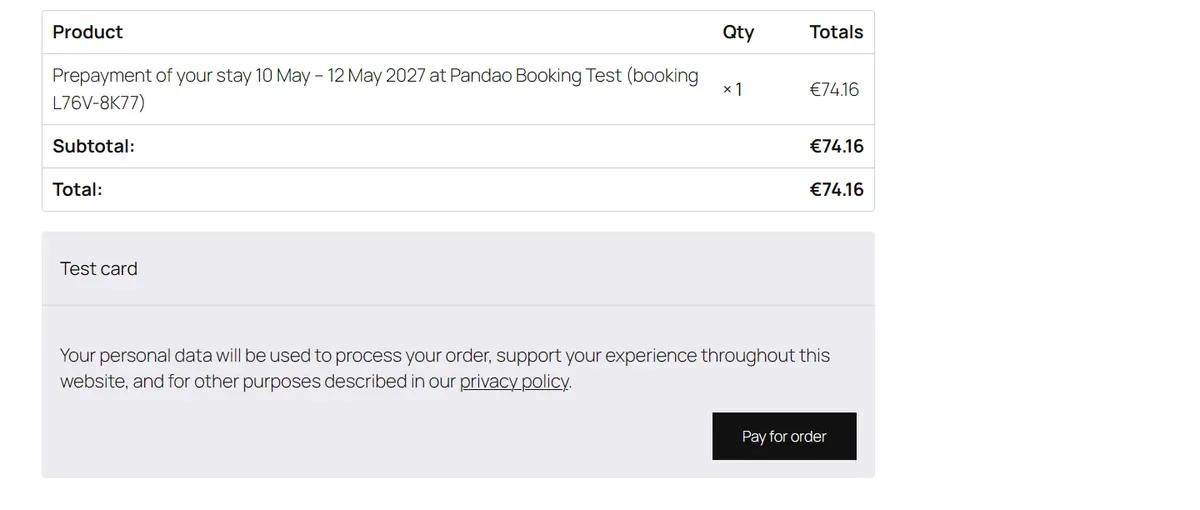
- The plugin creates a WooCommerce order for the amount due, the whole stay or the deposit you ask for, with a single line that names the stay and the booking reference. There is no product to create and no cart: the order exists only for this payment.
- The guest lands on WooCommerce's payment page, where the gateways you've set up are offered, and pays. WooCommerce doesn't ask the guest to fill in their details again; the rooms stay held meanwhile, for the time set in your payment settings.
- When the gateway marks the order paid, the plugin records the payment, confirms the booking and brings the guest back to the page of their booking. If the guest closes the browser after paying, WooCommerce still reports the payment and the booking is confirmed all the same.
Which gateways work
Any WooCommerce gateway that takes the payment online, in the currency of your bookings: cards through Stripe or your bank's gateway, Apple Pay and Google Pay, iDEAL, Bancontact, UPI, M-Pesa, Klarna, Mercado Pago, Paystack, Razorpay, Mollie and the rest. You set them up once in WooCommerce › Settings › Payments, with the payment company's own plugin; Pandao Booking Pro offers them as they are.
Three WooCommerce methods are left out on purpose: bank transfer, cheque and cash on delivery. They would mark an order as pending without any payment, so the stay would either be released when the holding time passes or be recorded as paid when it isn't. The free plugin already handles bank transfers, cheques and payment at the property, with a deadline, a reminder and the release of unpaid bookings.
Deposits, holds and refunds
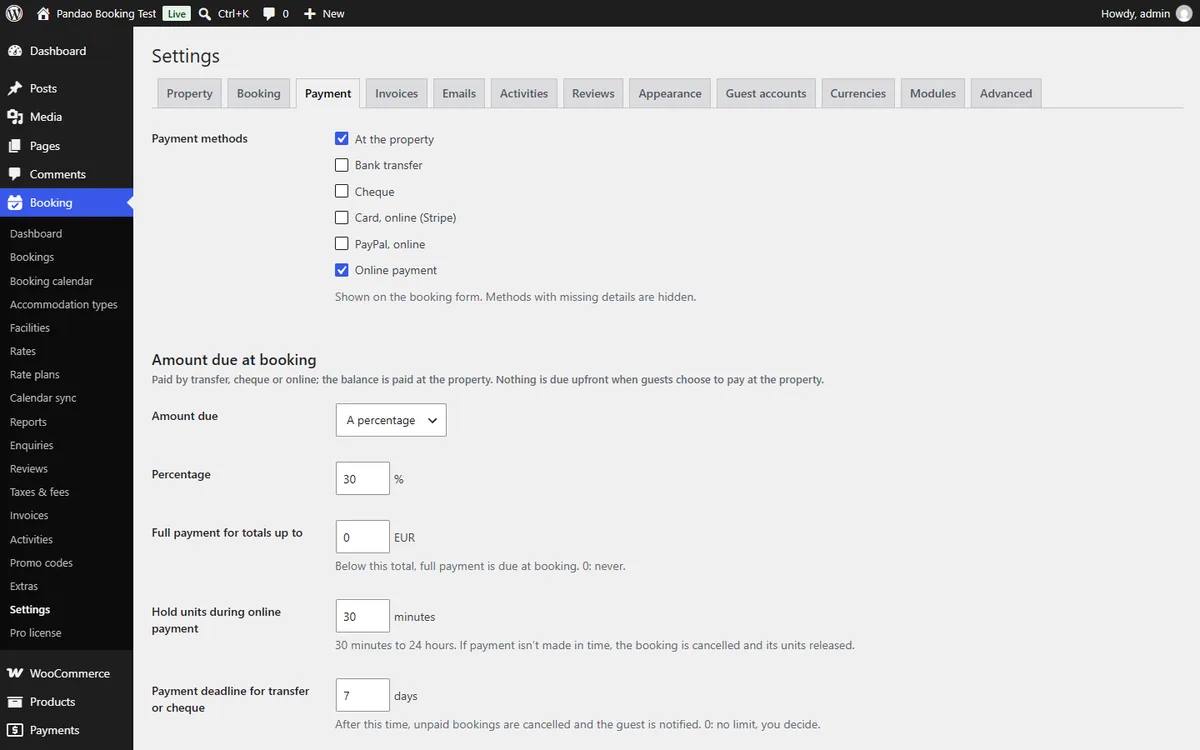
- Deposit or full stay. The amount sent to WooCommerce follows your payment settings: the whole stay, a percentage, the first night or a fixed amount. The balance is paid at the property. A guest who left the payment page without paying finds a Pay online button on their booking page, which opens a new WooCommerce payment while the rooms are still held.
- Rooms held while the guest pays. The units of the booking are held for the time you set (30 minutes to 24 hours). An order can't be paid any more once that time is over, even before the scheduled tasks have run, so a late payment never books a room that's been sold since.
- Refunds through the gateway. When a guest cancels online while cancellation is still free, the plugin asks the gateway to refund the payment, when the gateway supports refunds from WooCommerce. Otherwise the booking says the refund is to be made by hand, as with a bank transfer.
- Orders follow the booking. A booking cancelled, or confirmed by the property while its payment page is open, cancels its unpaid orders, so nothing can be paid twice.
Setting it up
- Install WooCommerce, set its currency to the currency of your bookings, and set up your gateways in WooCommerce › Settings › Payments. You can skip its store pages: the module never uses the shop, the cart or products.
- In Booking › Settings › Modules, turn on Payments with WooCommerce. The module is off on a new site, because it only makes sense with WooCommerce and its gateways in place.
- In Booking › Settings › Payment, tick Online payment among the payment methods: the Online payment with WooCommerce section appears below, where you give the method the name your guests will see, for example "Pay by card or mobile money". If WooCommerce is missing or uses another currency, the tab says so instead of offering the method.
- Take a test booking with a gateway in test mode, then look at the order in WooCommerce › Orders and the payment on the booking.
What WooCommerce does, and what it doesn't
WooCommerce handles the payment page, the gateways and the refund calls. Everything else stays with Pandao Booking: the availability, the prices, the booking emails, the guest's booking page, the invoices if you use the Invoices module. WooCommerce sends none of its own emails for these orders, so guests never receive a "your order is processing" message beside their booking confirmation. The orders remain visible in WooCommerce › Orders, each one linked to its booking, which makes reconciling your gateway's payouts straightforward.
Common questions
Do I need WooCommerce to take card payments?
No. The free plugin takes cards through Stripe (with Apple Pay and Google Pay) and PayPal on their own checkout pages. WooCommerce is for the gateways they don't cover, or for a gateway you already use.
Can I offer Stripe and a WooCommerce gateway side by side?
Yes. Every method you tick in the Payment tab is offered on the booking form; guests choose.
Will my bookings appear as WooCommerce sales?
Each payment creates an order, so WooCommerce's reports count them as orders. Your booking figures, occupancy, revenue, ADR and RevPAR, come from the Reports module, which counts nights and stays rather than orders.
Does the currency have to match?
Yes. WooCommerce must use the currency of your bookings. With the Currencies module, guests can still see prices in their own currency; they pay in yours.
Get Pandao Booking Pro
WooCommerce payments and five more modules for your WordPress booking site: from $99 a year for one site, or a one-time $299 for a lifetime licence. 30-day money-back guarantee.
More Pandao Booking Pro features
- Hotel invoice plugin for WordPress: PDF invoices and credit notesNumbered PDF invoices for every stay booked on your WordPress site, with VAT by rate, the tourist tax shown separately, credit notes and a monthly export.
- Hotel guest reviews plugin for WordPress: verified reviews on your own siteCollect verified reviews from guests who stayed, moderate them with published guidelines, respond publicly and show the average rating on your WordPress site.
- Hotel revenue reports in WordPress: occupancy, ADR and RevPAROccupancy, room revenue, ADR and RevPAR for any period, by room type and booking source, with spreadsheet exports, inside your WordPress booking site.
- All Pandao Booking Pro featuresInvoices, reviews, reports, WooCommerce payments, multi-currency prices and activities, with pricing and the free vs Pro comparison.
Related guides
- How to set up hotel bookings on WordPress with a free plugin, step by stepFrom the plugin upload to your first test booking: property, rooms, rates, Stripe in test mode and the booking form on your page, with a screenshot of each step.
- How to calculate RevPAR, ADR and occupancy rate (with a worked example)The three figures every hotel manager should know: formulas, a worked example, and which one to watch when you change your prices.
- MotoPress Hotel Booking alternative: a free WordPress plugin comparedMotoPress Hotel Booking and Pandao Booking compared: what each one includes free, what costs extra, and which Pandao product fits your property.